
eBay saved search alerts work, and they are free. You save a search, eBay emails you when new listings match it, and the app can send a push notification too. The catch is timing. From what we see, and from what members report in our Discord, the email turns up in a batch an hour or more after the listings went live, sometimes not until the next morning. eBay does not publish a schedule, so treat that as our observation rather than an official figure.
For a quiet niche, where a good listing sits unsold for a day, that delay does not matter and a saved search is worth setting up properly. For anything competitive, a mispriced console or trainers at half price, the item is usually gone before the email lands, which is why resellers run a dedicated eBay monitor alongside. This guide covers both: the setup steps on the app and website, the settings most people skip, what to do when alerts stop, and a straight comparison with a monitor.
How to set up a saved search on eBay UK
Apply every filter before you save. eBay's help page says that editing a saved search creates a new one rather than changing the old one, so getting it right first time avoids a pile of near-duplicates.
On the website
- Search on ebay.co.uk with keywords broad enough to catch badly written titles: "nintendo switch oled" rather than the full model name.
- Use the filters down the left: category, condition, Buy It Now, price range, and Item location set to UK Only.
- Change the sort order to Newly listed.
- Select Save this search at the top of the results. On most versions it is a heart icon next to the search name.
- Open My eBay, Saved, Searches. Each saved search has an envelope icon: filled in means email alerts are on, and selecting it turns them off or on.
In the eBay app
- Search, tap Filter, set the same options, then tap Show results.
- Tap the heart or Save at the top of the results. The wording moves between app versions; the heart is the constant.
- Allow notifications in My eBay, Settings, Notifications, then check your phone allows eBay to notify you at all: Settings, Notifications, eBay on iPhone; Settings, Apps, eBay, Notifications on Android.
- Your searches sit under Saved, with the same envelope toggle for email.
What the alerts actually do, and when they arrive
A saved search alert is a summary, not a live feed. It lists the listings that matched since the last email, one email per saved search, so a busy search produces a long scroll and a quiet one nothing for days. The app notification, where you have it on, says there are new matches rather than sending each listing separately.
On timing, eBay's help pages say only that you will get an email "when new items matching your search are listed" and that the number of notifications varies with your activity. In practice, what we and our members see is a batch arriving an hour or more after the listings went live, with overnight listings landing together in the morning. We have never seen a saved search email arrive within a minute of a listing.
Also: every buyer with the same saved search gets the same batch at the same time, so the email is a starting gun for everyone, not a head start for you. And relisted items count as new, so they show up in your alert again.
The settings people miss
Most saved searches are too wide. These settings turn a keyword into a filter that only shows you things worth opening.
- Buy It Now only. Under Buying format, tick Buy It Now. If you want auctions, give them a saved search of their own.
- UK only. Set Item location to UK Only. Listings from abroad take weeks, often carry import charges, and are rarely the underpriced ones.
- Price range. Set the ceiling from what the item sells for, not what it is listed at: sold price, minus eBay's fees and postage, minus the profit you want. Set a floor of a few pounds too, to drop the empty-box and manual-only listings.
- Condition. Tick only the conditions you will buy. "For parts or not working" is a search of its own for people who repair.
- Exclude words with the minus sign. Put a minus directly in front of the word, with a space before it and none after:
nintendo switch -lite -case -controller -box. To exclude a group at once, use a minus before a bracketed list:nintendo switch -(lite,case,controller,box). The exclusions are saved with the search, so the alerts respect them. - Catch misspellings with brackets. Brackets without a minus mean either/or:
(addidas, adiddas, adidas). Misspelt listings get fewer views, which is exactly why they go cheap. - Newly listed sort. Save the search sorted by Newly listed. The alert does not care, but every time you open the search yourself you see the freshest listings first instead of Best Match.
One tight search per niche. Five narrow searches beat one wide one, because a short batch gets read.
Where saved searches still earn their keep
We run an eBay monitor, so you might expect us to dismiss saved searches. We do not. They are the right tool in three situations.
Low-competition niches. Obscure collectables, discontinued parts, specific vintage labels, hobby equipment with a small market. A well-priced listing here can sit for hours or days before anyone who can value it comes along, so an hour's delay costs you nothing.
Auctions. An auction runs for days, so a late batch is irrelevant. A saved search set to Auction only is a free way to keep a list of lots to watch.
Collection-only and job lots. Collection-in-person listings and big bundles have a much smaller pool of buyers, because most people will not drive to them. Our guide to finding underpriced eBay listings goes through the searches members use for these.
They also cost nothing, which makes them the right starting point for anyone reading our eBay reselling for beginners guide.
The honest limits for anything competitive
In busy categories the model breaks down. Consoles, popular trainers, graded Pokémon cards, retired LEGO sets, current phones: a Buy It Now listing priced well under sold value is bought within minutes of going live. By the time a batched email arrives, it is a list of things you missed.
- The delay is measured in hours; the window for a mispriced listing is measured in minutes.
- Everyone with the same saved search receives the same batch, so you are racing them from the moment it lands.
- You get eBay's filters and nothing more. There is no way to require a word in the title on top of the search.
- A batch is a scroll, not an alert. Nothing tells you which listing is the good one.
- No sold-price check is attached, so every listing means a separate trip to sold listings to confirm the margin.
None of this is a flaw in eBay. Saved searches were built for a collector waiting for a rare record, not for someone who needs to be first. In a competitive niche the fix is a different tool, not a better saved search.
Common problems and fixes
The alerts have stopped
The most common complaint we hear. Check these in order:
- Open My eBay, Saved, Searches and look at the envelope icon on that search. It is easy to switch off by accident.
- Search your inbox for "ebay" and look in spam and any promotions tab.
- Confirm eBay is allowed to send notifications in the phone's own settings, not just inside the app.
- Open the search sorted by Newly listed. If nothing new has been listed, there was nothing to send. Very narrow searches go quiet for days.
- If all of that looks right and the search was busy, eBay has quietly stopped sending for it. We see this a few times a year. Delete the saved search and save it again from a fresh results page, which fixes most of them. If not, the fault is on eBay's side and you can only wait.
Too many results
Tighten it. Add minus words for the accessories that keep appearing, set a price floor, restrict the category, tick Buy It Now only and UK only. If one search still floods you, split it into two narrower ones.
Duplicates and repeats
Either you have overlapping saved searches, so merge them with brackets, (ps5, playstation 5), rather than running two. Or a seller has relisted an unsold item, which eBay treats as new. There is no setting for the second; recognise the photos and move on.
Nothing ever matches
The search is too tight or contains a typo. Open it, remove one filter at a time and watch the result count.
Everything in the email is already sold
Not a fault. That is the delay at work, and the signal that your niche needs a monitor.
How a dedicated monitor differs
A monitor is separate software that checks eBay continuously, tests every new listing against your filters and sends each match on its own, within seconds, to somewhere you will see it. The Resellers Paradise eBay bot is one of these. Other groups run their own; this is how ours works.
- Setup takes an eBay search link. Build the search on eBay with every filter you want, then paste the URL into Add Monitor in our Discord. Whatever the link filters, the monitor filters, newest listed first. You can add whitelist words that must appear in the title on top, which eBay's own alerts cannot do.
- One DM per listing. Each new UK listing that matches is sent to your Discord DMs, usually within seconds of going live, with the photo, price, a sold-price link and a View on eBay button that opens straight in the eBay app. No batch, no scrolling, and nobody else gets your alert.
- Price Check. A button in the same panel: pick a condition, type the title, add whitelist or blacklist words if you want, and it returns the live average sold price, so your ceiling comes from real numbers.
- Up to 5 monitors per member, so pick the five niches you know best.
- Ready-made Pokémon channels. Shared monitors for singles and sealed product that compare each new listing with recent sold prices and flag the percentage under market. No setup; pick the role in Discord.
- It does not bid or buy. The alert arrives, you decide, you open the link and pay. It is a monitor, and there is no autobuy on eBay.
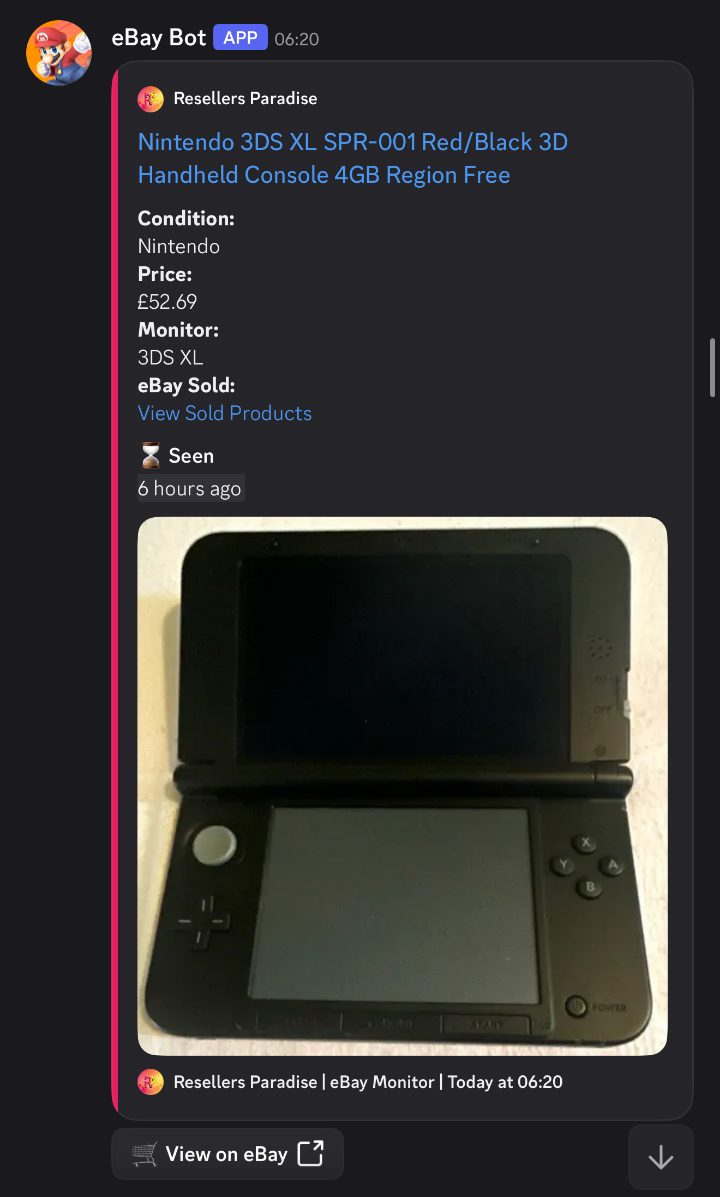
On speed we want to be precise. Matching listings arrive within seconds of appearing on eBay; the exact gap moves with the category and how busy eBay is. Unlike our Vinted bot, where we publish a measured head start over the app, we make no claim to beat eBay itself. The advantage is that you are not refreshing a search page, your filters are sharper, and the listing reaches you when it is indexed rather than in the next batched email. Against a saved search, that is a head start measured in hours.
Saved searches vs the RP eBay monitor
| eBay saved search | RP eBay monitor | |
|---|---|---|
| Cost | Free | Included in membership: £25 a month, everything included, cancel any time |
| How alerts arrive | Email digest, plus an app notification if enabled | One Discord DM per listing |
| When | Batched; an hour or more after listing in our experience | Usually within seconds of going live |
| Who else sees it | Everyone with the same saved search | Only you |
| Filters | eBay's own, including minus words | Everything in your eBay search link, plus whitelist words |
| Sold-price check | None | Price Check button and a sold-price link on each alert |
| Item location | Your choice | UK only |
| Number of searches | Many | 5 per member, plus shared Pokémon channels |
| Buys or bids for you | No | No |
| Best for | Quiet niches, auctions, collection-only, job lots | Competitive Buy It Now niches where minutes decide it |
Which should you use?
Both, for different jobs. Keep saved searches for the slow categories and for auctions, where they cost nothing and the delay is harmless. Put your most competitive Buy It Now niches on the monitor, where being first is the whole game. Our explainer on what an eBay bot is goes deeper on the second half, and the eBay fees guide covers the numbers you need before setting a price ceiling on either.
New to this? Start with the guide to reselling in the UK and the step-by-step starter page, then set up two or three saved searches in a niche you know. eBay is only one marketplace: the free live Vinted monitor shows what a per-listing feed looks like without signing up, and our eBay vs Vinted vs Depop comparison helps you decide where to spend your time.
Once you are buying to sell on, profit above the £1,000 trading allowance is taxable: the side hustle UK guide explains the rules and the side hustle tax calculator gives you your own figure. Membership is a deductible cost like any other tool; the pricing page has the details.
Frequently asked questions
How do I set up a saved search on eBay UK?
Search for the item on ebay.co.uk or in the eBay app, apply your filters first (category, condition, Buy It Now, price range, UK only), then select Save this search, the heart icon at the top of the results. The envelope icon on each saved search turns email alerts off and on. In the app, also allow eBay notifications in My eBay, Settings, Notifications and in your phone's settings.
Why are my eBay saved search alerts not working?
Usually one of five things: the envelope icon on that search is off, the emails are landing in spam, app notifications are blocked at phone level, the search is so narrow that nothing new has matched, or eBay has quietly stopped sending for that search. Check the first four, then delete the saved search and save it again, which fixes most stuck searches in our experience.
How long do eBay saved search emails take to arrive?
eBay does not publish a schedule. From what we and our members see, the emails come in batches, typically an hour or more after the listings went live, and sometimes not until the next morning. Treat that as our observation rather than an official figure. For auctions and slow niches it rarely matters; for underpriced Buy It Now listings in busy categories, the item is usually sold before the email lands.
Can I get an instant alert for every new eBay listing?
Not from eBay itself. Saved search alerts are batched and arrive as a list. For one alert per listing within seconds of it going live, you need a dedicated eBay monitor. The Resellers Paradise eBay monitor takes an eBay search link plus optional whitelist words and DMs you each matching UK listing in Discord, usually within seconds, with a direct link and a Price Check for recent sold prices. It does not bid or buy for you.
How do I exclude words from an eBay search?
Put a minus sign directly in front of the word, with a space before the minus and none after it: nintendo switch -lite -case -controller. To exclude several words at once, use a minus in front of a bracketed list: nintendo switch -(lite,case,controller). Brackets without the minus mean either/or, which is useful for misspellings: (addidas, adiddas). The exclusions are saved with the search, so the alerts respect them.
What is the difference between an eBay saved search and an eBay monitor?
A saved search is eBay's free, built-in feature: it emails you a batch of new matches, usually an hour or more after they were listed, using eBay's own filters. A monitor is separate software that checks eBay continuously and sends you each matching listing on its own, within seconds, with extra filtering and a sold-price check attached. Saved searches suit auctions and quiet niches; a monitor is for competitive Buy It Now listings where the first person to open the link gets the item.
Sources
- eBay UK Help, Saved searches: how to save, edit and delete a search, and the envelope toggle for email alerts. eBay states it emails you "when new items matching your search are listed" and gives no delivery schedule.
- eBay UK Help, Notifications and subscriptions: app, email and SMS notification settings, including the phone-level settings paths for iPhone and Android.
- Alert timing (an hour or more, sometimes next morning) is what we and our members observe, not an official eBay figure. Details of the RP eBay monitor are from our eBay bot page.
Stop waiting for the batched email
Join 1,500+ members using the eBay monitor, Vinted bot, discount monitors and the RP app.
Use code WEBSITE for 20% off your first month.